How to Choose a Managed IT Services Provider
A Comprehensive Guide for Chicago-Area Small and Midsized Businesses
By Adam Barney, President of Framework IT | Last Updated: April 2026
I've watched companies sign 3-year managed IT services contracts based on a 30-minute sales call and a lowball quote, then spend the next 36 months paying for it. Slow response times. Security gaps they didn't know existed. Surprise invoices for things they assumed were included. The managed services industry makes it easy to choose wrong, because most providers sound identical on paper.
Choosing the right Managed Services Provider (MSP) changes the trajectory of your business. Your people are productive, your data is protected, and your leadership team has a clear view of where technology fits into the business plan. The challenge is separating the providers who actually deliver that from the ones who just promise it. A Managed Services Provider (MSP) is a company that manages a business's IT infrastructure, support, security, and strategic planning under a predictable monthly contract, essentially serving as your outsourced IT department.
The challenge is that most MSPs — especially in a competitive market like Chicago — sound the same on paper. They all promise proactive service, responsive support, and enterprise-grade security. The difference is in how they actually deliver, and you won't discover that until you know what to look for.
This guide gives you a structured framework to evaluate managed IT services providers. It covers the criteria that matter, the red flags that should make you walk away, the questions you should ask in every evaluation, and a scoring tool to compare providers side by side. Whether you're evaluating MSPs in Chicago for the first time or considering a switch, this is the playbook.
Before You Start Evaluating an MSP: Define What Your Organization Needs
Before you talk to a single provider, get clear on your starting point. Answering these questions internally will help you evaluate proposals more effectively and avoid being sold services you don't need.
Your Current IT Situation
Your Business Requirements
Your Priorities
Having clear answers to these questions will help you cut through marketing language and focus on whether a provider can actually solve the problems you need solved.
What to Look for in a Managed IT Services Provider: 8 Criteria That Matter
After evaluating your own needs, here's what to measure every provider against. These aren't nice-to-haves. They're the operational markers that distinguish a mature, reliable MSP from one that's going to create new problems while pretending to solve old ones.
1. They Lead with an Assessment, Not a Sales Pitch
A provider worth hiring will insist on understanding your environment before quoting you a price. That means conducting a technology assessment, reviewing your infrastructure, identifying gaps, and building a picture of where you stand today. Providers who skip this step and jump straight to a proposal are guessing, and you'll pay for that guesswork.
The assessment should produce something tangible: a strategic roadmap showing gaps, priorities, and a timeline for improvement. In our experience onboarding over 1,000 clients, the companies that skip this step almost always end up overpaying for services they don't need or underinvesting in areas that create real risk. This becomes the foundation of the partnership, not just a sales tool.
2. They Deliver All 3 Pillars: Support, Strategy, and Security
Managed IT services isn't just a help desk. A comprehensive provider covers 3 distinct pillars:
If any pillar is missing or treated as an add-on, you're looking at a support contract with gaps, not a managed services partnership.
3. They Assign You a Dedicated Account Team
Many providers assign you a single point of contact, or worse, whoever happens to be available when you call. A mature MSP assigns a dedicated team that knows your environment, your people, and your business objectives. At minimum, look for:
4. They Put Guarantees in Writing
Every MSP claims to provide great service. Fewer are willing to guarantee it. Ask specifically about:
If a provider hesitates to put commitments in writing, that tells you something about their confidence in their own delivery. I'll give you a real-world benchmark: at Framework IT, we guarantee a measurable reduction in IT issues after alignment. Providers who are performing well should be willing to stand behind their numbers.
5. Their Pricing Model Rewards Improvement
Most MSPs charge a flat rate regardless of whether your environment is healthy or falling apart. That creates a misaligned incentive: the more problems you have, the more they get paid. Or, they cut costs by providing less service to protect their margin.
The better model ties pricing to outcomes. Look for providers whose pricing decreases as your technology environment improves, rewarding you for following best practices. Think of it like a safe driver discount: adopt the behaviors that reduce risk and downtime, and your costs go down. This alignment means both parties benefit when things go well.
Learn More About Framework IT's Business Optimization Process and Pricing Model
6. They Have Real Operational Depth
Ask about team size, structure, tenure, and certifications. You want a provider with:
For Chicago-area businesses, local presence matters. When you need someone onsite, you need someone who can be there, not a technician dispatched from 3 states away.
7. They Provide Transparent Reporting and Data
A great MSP is proud of their numbers and reports them proactively. You should receive regular reports covering:
If a provider doesn't measure these things, or measures them but doesn't share the data, they're not operating with the transparency a partnership requires.
8. They Make the Transition Easy
The onboarding process tells you a lot about how a provider operates. A mature MSP will have a structured transition process that includes:
Ask every provider to walk you through their onboarding process. If the answer is vague, the experience will be too.
What Are the Red Flags When Evaluating an IT Services Provider?
Not every provider is worth your time. Here are the warning signs that should end an evaluation:
In a market like Chicago — where hundreds of MSPs compete for small and midsized business accounts — these red flags are especially common. The competitive pressure leads some providers to undercut on price by stripping out critical services, making it even more important to evaluate proposals carefully rather than defaulting to the lowest bid.
Can I Switch Managed IT Providers Mid-Contract?
Yes, but the process depends on your contract terms. Most MSP agreements include termination provisions that allow you to exit with 30 to 90 days' notice, sometimes with an early termination fee. The practical challenge isn't the contract itself. It's the transition. Switching providers requires migrating documentation, transferring security tools, reconfiguring monitoring, and communicating changes to your team. A well-managed transition typically takes 30 to 60 days. Before signing any agreement, review the exit provisions carefully and confirm that the provider will cooperate with a transition if the relationship doesn't work out.
How Do I Know if My Current MSP Is Underperforming?
Look for these indicators: recurring IT issues that never get fully resolved, slow or inconsistent response times, no proactive communication about your technology health, the absence of a strategic advisor or regular business reviews, and surprise invoices for services you thought were included. If your MSP can't produce reports showing ticket volume trends, response time averages, and client satisfaction scores, they're not measuring their own performance. Ask for these numbers. If they don't have them, that's your answer.
What Questions Should You Ask Every MSP or IT Services Provider?
Use these questions during your evaluation conversations. They're designed to cut through marketing language and surface how a provider actually operates. Good providers will welcome these questions. Weak ones will struggle with them.
Support and Service Delivery
Strategy and Planning
Cybersecurity
Pricing and Accountability
Team and Operations
For the full list of 23 questions with detailed guidance on what to listen for in each answer, email info@frameworkit.com to receive a complete copy of our 23 Questions to Ask Every IT Services Provider guide.
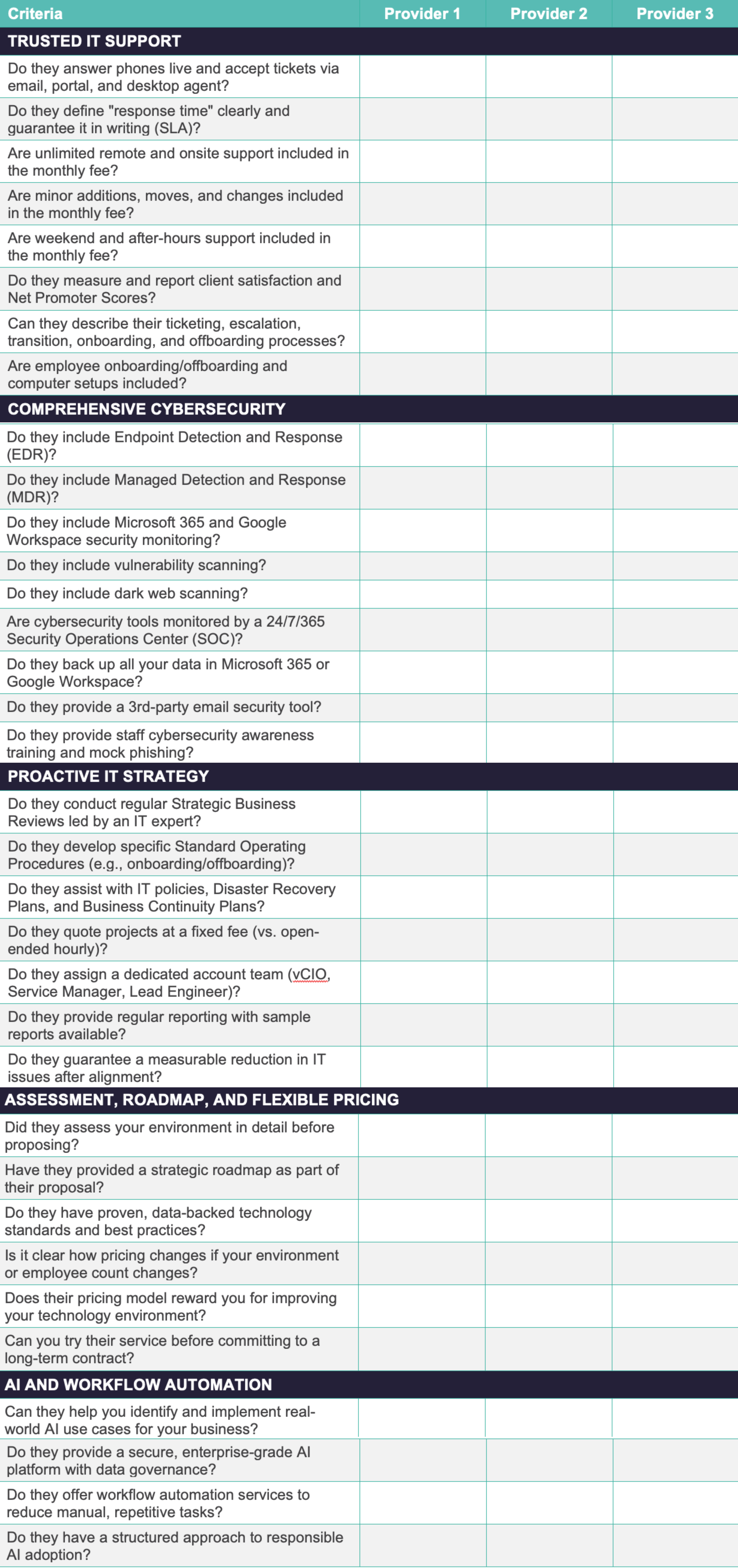
Scoring:
Tally the checkmarks for each provider. A comprehensive, operationally mature MSP should meet all or nearly all 34 criteria. Significant gaps in any category signal areas where your organization will be underserved.
Download the complete IT Provider Comparison Chart — including Framework IT's answers — at IT Services Provider Comparison Chart.
How to Compare Managed IT Services Proposals
Once you have proposals in hand, avoid the temptation to compare headline pricing alone. Instead, build a comparison on these dimensions:
The best proposal isn't the cheapest. It's the one where the provider has done the most homework, offers the most comprehensive scope, and puts the most accountability in writing.
What Does Good MSP Onboarding Look Like?
The first 90 days of a managed services relationship set the tone for everything that follows. Here's what a strong onboarding process should include:
If an MSP's onboarding process is rushed, vague, or nonexistent, the relationship will reflect that. We've taken over environments from providers who never documented a single network password or asset, leaving the client essentially starting from scratch. The providers who invest the most in onboarding are the ones who deliver the best long-term results.
About Framework IT
About the Author
Related resources:
To go deeper on any of the topics in this guide, explore these companion materials: